In this article, you will learn how to build a real-time chat application using NodeJS, ReactJS, and the Socket.io library. This article will provide a good introduction to WebSockets and the Socket.io library.
The application will be very simple in terms of features and design, as it is mainly intended to demonstrate the basic implementation of a Socket server and how to interact with it in a frontend application.
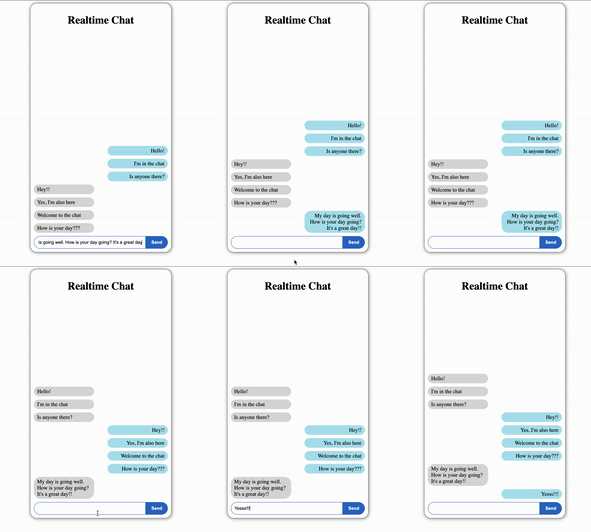
Here is a video of the final application:
Prerequisites
In order to follow along with the tutorial, you will need the following:
- NodeJS v10+ installed
- Basic knowledge of NodeJS, Express, ReactJS
WebSockets & Socket.io
Before we start building the application, we will discuss what WebSockets is and why it is useful for building web applications with real-time features.
WebSockets is a protocol for bidirectional, or two-way, communication between a client and server.
But what makes a bidirectional communication protocol like WebSockets preferable to a unidirectional protocol like HTTP when building real-time features?
While HTTP requires the client to send a request to the server first to receive any data, a bidirectional protocol such as WebSockets allows the connection between client and server to persist.
This means that a client is not required to make a new request to the server every time that they want to check for new data from the server.
In this tutorial, we will use the WebSockets API to implement a real-time chat, but we won’t be working with the API directly. Instead, we will use Socket.io as a wrapper over WebSockets.
Socket.io is a library that abstracts away all of the complications of working with WebSockets, allowing you to implement bidirectional communication in your application with less headache.
The Socket.io library contains two parts: a server that mounts onto the NodeJS HTTP server and a client-side library for the browser.
Building the Socket Server
We will start by building out the backend of the application.
First, create a new NodeJS project by running the following command:
npm init -y
Installing dependencies
We will need to install the following packages:
- Express: NodeJS framework that makes building back end web applications easier
- Socket.io: Library that enables real-time, bi-directional client-server communication
- CORS: Mechanism that allows restricted resources from a domain to be shared with other domains
npm install express socket.io cors
Create a server file called index.js. Inside the server file, import Express and create an Express app:
const express = require("express");

const app = express();
CORS middleware
Cross-origin resource sharing (CORS) is an HTTP header mechanism that allows servers to grant permission to other external domains to access server resources.
The CORS NodeJS package provides a middleware that can be used to enable CORS on your server.
Import the CORS package and enable the Express server to accept cross-origin HTTP requests:
const cors = require("cors");

app.use(cors());
Creating Socket IO object
Although HTTP comes built-in to Express, we will need to access it directly to set up the Socket.io server.
So, we need to first create an HTTP server, which we can do using the built-in HTTP library in NodeJS.
const http = require("http");
const server = http.createServer(app);
Import the Server function from Socket.io:
const { Server } = require("socket.io");
Now, we will initialize a new instance of socket.io by calling all the Server function from Socket.io, taking in the HTTP server as an argument. Since we will be accessing the backend from a cross-origin frontend browser application, we need to pass a CORS object as an optional second argument to allow any URL to access our server URL:
const io = new Server(server, {
  cors: {
    origin: "*",
    methods: ["GET", "POST"],
  },
});

server.listen(8000, () => {
  console.log(`Server is running on port ${PORT}`);
});
Creating Socket event listener
Now, we can implement Socket IO logic. Just like WebSockets, it’s an event based system. When an event is emitted, you will have access to any data that was passed along with the event in the callback function. There, you can implement some function in response to the event.
The first event that you will want to listen for is the connection of a client from the frontend. The callback of the connection event will give us access to the client Socket object.
io.on('connection', (socket) => {
    console.log('new client connected');
});
Whenever there is a new Socket connection, we will send the user that connected their Socket ID using io.to().emit()
By calling to and passing in the client’s Socket ID, we are ensuring that the event is only emitted to the specific client.
io.on("connection", (socket) => {
  io.to(socket.id).emit("socket_id", socket.id);
});
Now, we will create a custom event handler to handle the send_message event from the client. This event will be emitted anytime a user submits a new message in the chat application. The message data that is sent along with the event is passed to the callback function.
Taking the message data, the server emits a receive_message event to all clients connected to the server (except the client who sent the message). In short, this event sends newly submitted messages to other users of the application.
io.on("connection", (socket) => {
  socket.on("send_message", (messageData) => {
    socket.broadcast.emit("receive_message", messageData);
  });
});
We have finished implementing the backend for the application. Here is the full server file code:
const express = require("express");
const http = require("http");
const cors = require("cors");
const { Server } = require("socket.io");

const app = express();
const server = http.createServer(app);

app.use(cors());

const io = new Server(server, {
  cors: {
    origin: "*",
    methods: ["GET", "POST"],
  },
});

io.on("connection", (socket) => {
  io.to(socket.id).emit("socket_id", socket.id);

  socket.on("send_message", (messageData) => {
    socket.broadcast.emit("receive_message", messageData);
  });
});

server.listen(8000, () => {
  console.log(`Server is running on port 8000`);
});
Building React frontend application
In a separate client folder, create a new React application by running the following command:
npx create-react-app client
Now, open the App.js file in the src folder. This is the only file we’ll be using in the React project.
React boilerplate setup
Before we add Socket IO to the frontend, we will set up the layout of the frontend, create state variables and other Hooks elements, and handle some other boilerplate.
socketID will store the ID of the client’s socket.
currentMessage will store the text typed into the input. When the user presses the Send button, the will send this message text to other clients in the send_message event.
messageList will store all of the messages– both from the current user and other users– sent thus far.
The sendMessage function will be responsible for sending messages from the current user to the server.
import React, { useState, useEffect, useRef } from "react";
import "./styles.css";

function App() {
  const [socketID, setSocketID] = useState("");
  const [currentMessage, setCurrentMessage] = useState("");
  const [messageList, setMessageList] = useState([]);

  const sendMessage = async () => {

  };

  useEffect(() => {

  }, []);

  return (
    <div class="container">
      <h1>Realtime Chat</h1>

      <div class="msg-container-wrapper">
        <div class="message-container">
          {messageList.map((msg) => {
            return (
              <div class={`message ${msg.sender === socketID ? "my-msg" : "other-msg"}`}>
                {msg.message}
              </div>
            );
          })}
        </div>
      </div>

      <div class="input-container">
        <input
          type="text"
          value={currentMessage}
          onChange={(e) => setCurrentMessage(e.target.value)}
        />
        <button onClick={() => sendMessage(currentMessage)}>Send</button>
      </div>
    </div>
  );
}

export default App;
Installing Socket IO client
Socket IO is not a direct WebSocket implementation, which means that you can’t just use the built-in WebSocket class in the browser. Instead, you must use the Socket IO client library.
You can install it with the following command:
npm install socket.io-client
The io object, which is the Socket IO client library, will now be globally available in the browser and you can import it throughout your project.
Import the io object:
import { io } from "socket.io-client";
Create the connection by pointing to the URL of the server:
const socket = io("http://localhost:8000");
Now, we are ready to start listening to events from and emitting events to the server.
Getting client Socket ID from the server
In the useEffect hook, our client Socket will listen for the socket_id event from the server which sends the current user’s socket ID. We use this socket ID to differentiate between messages sent by the current user and messages sent by other users.
We also return an anonymous function that acts as a component cleanup upon unmounting.
useEffect(() => {
    socket.on("socket_id", (id) => {
      setSocketID(id);
    });

    return () => {
      socket.off("socket_id");
    };
}, [socket]);
Receiving messages from the server
Next, we will add an event listener to the useEffect hook to listen for the receive_message event. This event is triggered to receive any new messages from the Socket IO server.
When the event occurs, the data from the event, which is an array including the message text and the message sender, is added to the messageList array to be added on screen.
Again, we create an anonymous cleanup function for the event listener.
useEffect(() => {
    socket.on("receive_message", (data) => {
      setMessageList((list) => [...list, data]);
    });

    return () => {
      socket.off("receive_message");
    };
}, [socket]);
Sending messages to the server
Now, we will create a function that will send a new message to the Socket IO server. This will be an asynchronous function.
First, we check to make sure that the current message is not an empty string. If it is not, then we create a messageData object including the socket ID of the sender and the message text.
Then, we use the current user’s socket to emit a send_message event to the server, passing along the messageData object with it.
When the server gets this data, it will emit it to all of the other users in the application. However, the user who actually sent the message will not receive the data from the server. Instead, the data is added to the messageList manually. Then, the currentMessage is cleared.
const sendMessage = async () => {
    if (currentMessage !== "") {
      const messageData = {
        sender: socketID,
        message: currentMessage,
      };

      await socket.emit("send_message", messageData);
      setMessageList((list) => [...list, messageData]);
      setCurrentMessage("");
    }
};
We have finished implementing the logic for the frontend application. Here is the full App.js file code:
import React, { useState, useEffect, useRef } from "react";
import { io } from "socket.io-client";
import "./styles.css";

const socket = io("http://localhost:8000");

function App() {
  const [socketID, setSocketID] = useState("");
  const [currentMessage, setCurrentMessage] = useState("");
  const [messageList, setMessageList] = useState([]);

  const sendMessage = async () => {
    if (currentMessage !== "") {
      const messageData = {
        sender: socketID,
        message: currentMessage,
      };

      await socket.emit("send_message", messageData);
      setMessageList((list) => [...list, messageData]);
      setCurrentMessage("");
    }
  };

  useEffect(() => {
    socket.on("socket_id", (id) => {
      setSocketID(id);
    });

    socket.on("receive_message", (data) => {
      setMessageList((list) => [...list, data]);
    });

    return () => {
      socket.off("socket_id");
      socket.off("receive_message");
    };
  }, [socket]);

  return (
    <div class="container">
      <h1>Realtime Chat</h1>

      <div class="msg-container-wrapper">
        <div class="message-container">
          {messageList.map((msg) => {
            return (
              <div class={`message ${msg.sender === socketID ? "my-msg" : "other-msg"}`}>
                {msg.message}
              </div>
            );
          })}
        </div>
      </div>

      <div class="input-container">
        <input
          type="text"
          value={currentMessage}
          onChange={(e) => setCurrentMessage(e.target.value)}
        />
        <button onClick={() => sendMessage(currentMessage)}>Send</button>
      </div>
    </div>
  );
}

export default App;
With that, you have basically completed the application! All that is left is the CSS styling, which we won’t cover in this tutorial. In the links below, you can access the CSS that was used in the demo project.
Thank you for following this tutorial. Happy coding!



 Joshua Bowen's Notes