Getting External Data with Chainlink

In this article, I’m going to show you how to code a contract that has access to the conversion rate between ETH and USD using the Chainlink decentralized oracle.

Blockchains are deterministic systems. This means that there is no room for variability amongst the data in nodes; each node should have the same exact data.

In order to maintain a blockchain’s deterministic nature, smart contracts on the blockchain are unable to connect with external systems, data feeds, APIs, existing payment systems or any other off-chain resources on their own.

In order to get data from the real world, smart contracts need to use an oracle. An oracle is a trusted third-party that interacts with the off-chain world to provide external data or computation to smart contracts. In other words, oracles are the bridges between blockchains and the real world.

Oracles can provide blockchains with information about currency prices, the weather, political results, and much more.

An oracle cannot be centralized because then we would have the same problem: nodes in a blockchain could end up with different data. Instead, oracles must be decentralized.

Chainlink is the most popular decentralized oracle provider.

Writing the Code

I created my contract on Remix IDE and I am using Remix to test my contract. I won’t be explaining how to use Remix in this article.

In order to work with the Chainlink oracle, we need to import their code into our contract using this line:

import "@chainlink/contracts/src/v0.8/interfaces/AggregatorV3Interface.sol";

What exactly is this line doing, though? Basically, we are importing code from the chainlink/contracts npm module. If you go to the project’s Github (here), and follow the path in the import statement (here), you will get to the code where they define the AggregatorV3Interface interface. So, basically, we are importing the AggregatorV3Interface interface into our project so we can work with it.
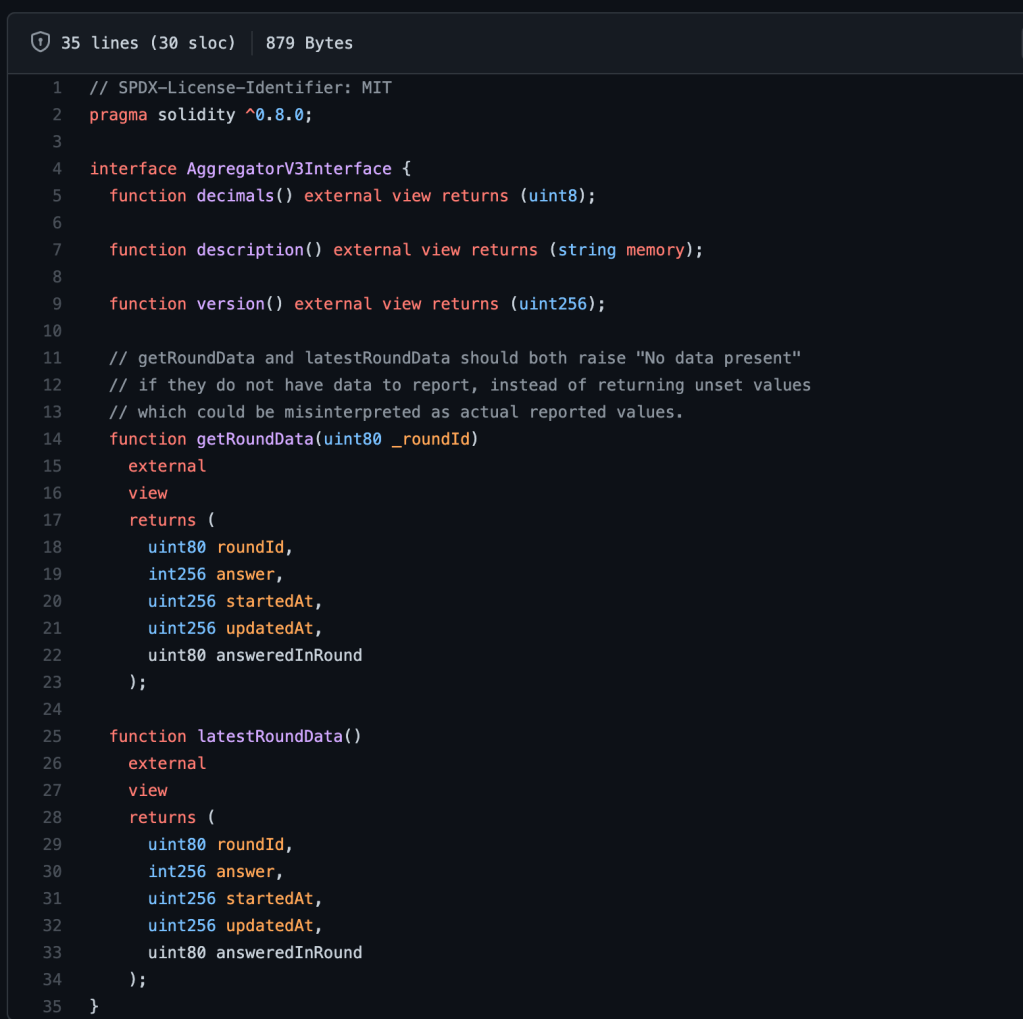
Interfaces are similar to abstract contracts. As you can see, the interface defines a function but it cannot define its implementation.

Interfaces tell your Solidity contract how it can interact with another contract. So, since we will be accessing Chainlink contracts, this interface tells our contract what functions we can use from the Chainlink contract.

We made a contract call to another contract from our contrat using interfaces. Interfaces are a minimalistic view into another contract.

We work with interfaces and other contracts the same way that we work with variables or structs within our own contracts.

Make Function to Get Interface Version

Now, we will access some information from the Chainlink blockchain using the interface. We will create a function to get the version of the interface.

function getVersion() public view returns (uint256){
}

First, we create an instance of the interface:

function getVersion() public view returns (uint256){
    AggregatorV3Interface priceFeed = AggregatorV3Interface()
}

In order to find where the ETH / USD price feed contract is located on the Chainlink Rinkeby blockchain, we can go to the Ethereum Price Feeds documentation:
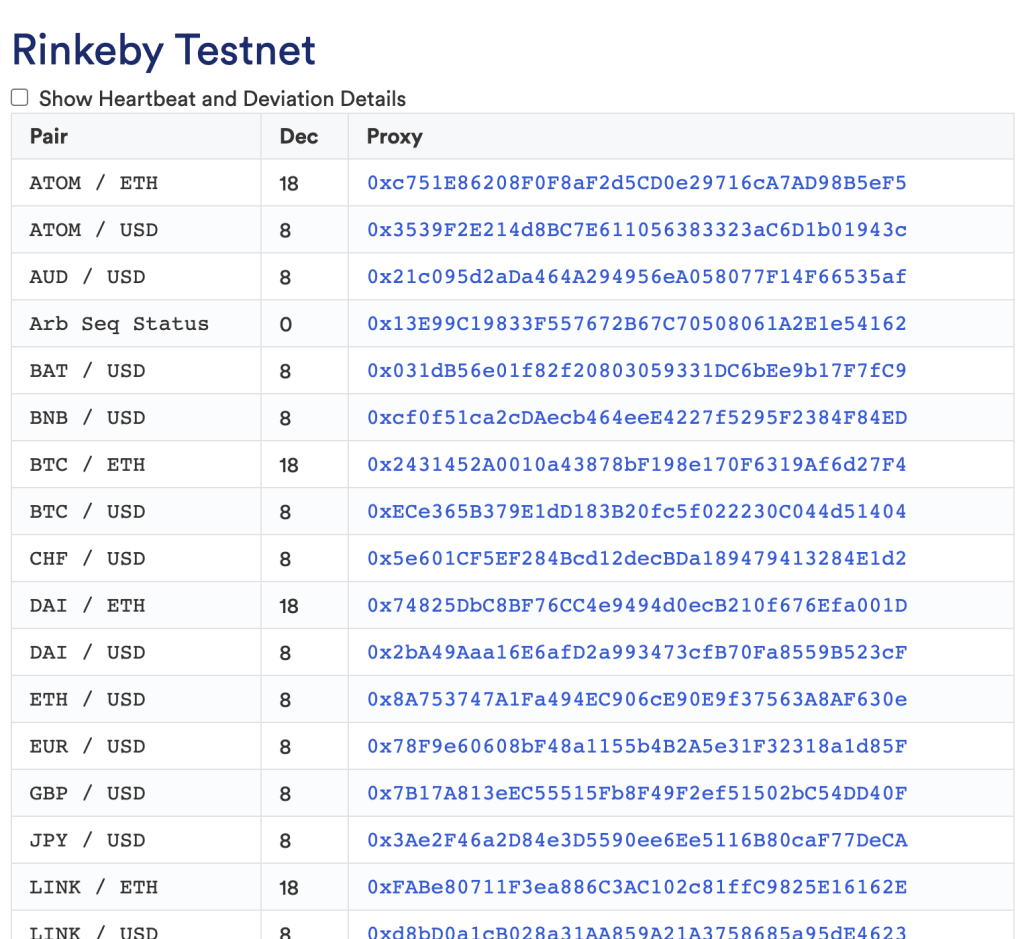
It has a bunch of different price feeds. Find the ETH / USD price feed contract address and put the address in the parameter of the interface:

AggregatorV3Interface priceFeed = AggregatorV3Interface(0x8A753747A1Fa494EC906cE90E9f37563A8AF630e)

So, basically this line is saying that we have a contract that has these functions defined in the interface located at the address 0x8A753747A1Fa494EC906cE90E9f37563A8AF630e.

If this is true, we should be able to call the version method on priceFeed:

AggregatorV3Interface priceFeed = AggregatorV3Interface(0x8A753747A1Fa494EC906cE90E9f37563A8AF630e);
return priceFeed.version();

The full function:

Now, you can deploy your contract and see if it works. In my case, using Remix IDE, I was able to access the getVersion function through the IDE, so it was successful!

Make Function to Get Latest Price

Now, we will create a function to get the current price of ETH in terms of USD from Chainlink.

We start by defining the function and creating another instance of the interface:

function getPrice() public view returns(uint256){
        AggregatorV3Interface priceFeed = AggregatorV3Interface(0x8A753747A1Fa494EC906cE90E9f37563A8AF630e);
}

We are trying to access the answer return variable from the latestRoundData method of the interface (see interface code above).

The latestRoundData method returns 5 items. Since we only need answer, we can ignore the other variables and just add commas for them:

(,int256 answer,,,) = priceFeed.latestRoundData();

Then, convert answer to uint256 and return it:

return uint256(answer);

The full function code:

Summary

Here is the final code:
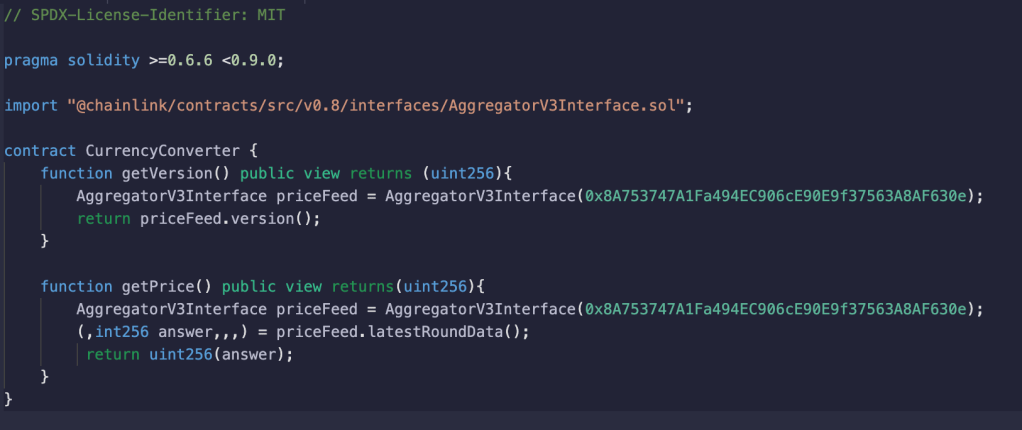
In this tutorial, you learned what oracles are and why they are important. You learned how to use the Chainlink oracle in your own smart contract to access real-world data on the blockchain.

Blockchain Development: Solidity Crash Course

Solidity is the programming language used to write Ethereum smart contracts. If you want to be an Ethereum blockchain developer, learning it should be one of the first things you do.

In this article, I’m going to be showing you some basic Solidity syntax and fundamental features that every smart contract must have. This article is for beginners but it assumes you have some prior knowledge in another programming language.

Versioning

At the top of any new smart contract file must be the Solidity version. You have a few options for denoting the version of your contract:

  • If the contract is for a specific Solidity version. In this case, 0.6.0:
pragma solidity 0.6.0
  • If the contract is for a version within the 0.6.0 range (0.6.0 to 0.6.12):
pragma solidity ^0.6.0
  • If the contract is for a version within the range from 0.6.0 to 0.9.0 (exclusive):
pragma solidity >=0.6.0 <0.9.0

You might be wondering: which version should I use? When deploying contracts, you should use the latest released version of Solidity. Apart from exceptional cases, only the latest version receives security fixes

Contract Declaration

Declare a new contract using the contract keyword followed by the contract’s name:

contract Bank {

} 

As you can see, the syntax for defining a new contract in Solidity is similar to the syntax for defining a class in a language like Java or Python.

This is the most simple version of a valid contract.

Types and Declaring Variables

Solidity has pretty much all of the same data types as any other programing language.

There are multiple different sizes of integers that you can create. For example,

uint256 newNumber = 6;

There are also some data types that you may not be familiar with.

For example, there is an address type for storing account addresses on the blockchain, such as a MetaMask account address:

address accountAddress = 0x29D7d1dd5B6f9C864d9db560D72a247c178aE86B;

Comments

Comments are denoted using two slashes (//)

// This is a comment in Solidity

Defining Functions

Defining functions in Solidity is similar to other languages

function storeMoney(uint256 _amount) {
}

If a function returns a value, you can use this syntax:

function storeMoney(uint256 _amount) returns (uint256) {
   return _amount;
}

Visibility

Visibility refers to where functions and variables within a Solidity contract are available. There are four types of visibility:

  1. External: Functions/variables with external visibility must be called by another contract; they can’t be called within the same contract
  2. Public: Functions/variables with public visibility can be called by anybody, including any users of the blockchain
  3. Internal: Functions/variables with internal visibility can only be accessed internally (i.e. from within the current contract or contracts deriving from it)
  4. Private: Functions/variables with private visibility are only visible for the contract they are defined in and not in derived contracts

To specify the visibility of a function:

function storeMoney(uint256 _amount) public {
}

To specify the visibility of a variable:

bool private isCheckingAccount;

View and Pure Functions

If a function updates the value of a variable in a smart contract, it is changing the contract’s state. Any state change in a smart contract is considered a transaction and thus requires a gas fee to update the contract.

There are two types of functions that do not update the state of the contract: view and pure functions. In other words, these are functions you do not have to make a transaction on and they don’t cost gas.

A view function reads some state off of the blockchain. Public variables are already technically view functions.

function retrieveBalance(uint256 _balance) public view returns (unit256) {
   return _balance;
}

A pure function is a function that purely does some type of math, but does not store the output of that math. Thus, there is no change of the blockchain’s state since no variables are being saved or updated.

function addBalances(uint256 balance) public pure {
    return balance + balance;   // balance is not being updated
}

Structs

Structs are a way to define new type in Solidity. They are structures that contain one or more native Solidity variable types.

Define a new struct:

struct Account {
   uint256 balance;
   string name;
}

Create an instance/object of the struct:

Account public myAccount = Account({ balance: 100, name: "John Doe" });

Define an array of struct objects;

Account[] public accounts;    // dynamic array (can grow to any size)

Account[3] public accounts;   // fixed array (fixed size of 3)

Memory

In Solidity, there are two main ways to store information: you can store it in memory or in storage.

When you store an object in memory, the data will only be stored during the execution of the function/contract call. When an object is stored in storage, the data will persist even after the function executes; it will persist.

Strings are actually not a variable type in Solidity. In Solidity, strings are objects– arrays of bytes. Since it’s an object, the programmer has to decide where they want to store it: memory or storage.

function addAccount(string memory _name, uint256 _balance) {
    accounts.push(Account(_balance, _name));
}

Mappings

mapping is a Solidity variable type that is similar to a dictionary in other languages. It is an array of key-value pairs (with 1 value per key). If given a key, a mapping spits out whatever variable that that key is mapped to.

mapping(string => uint256) public nametoBalance;

function addAccount(string memory _name, uint256 _balance) {
    accounts.push(Account(_balance, _name));
    nametoBalance[_name] = _balance;
}

SPDX License

Many times, the compiler will raise an error if your source code file doesn’t include an SPDX License Identifier.

The Ethereum community believes that trust in smart contract can be better established if their source code is available. For legal reasons, the SPDX License Identifier makes it easier for your source code to be accessed by others.

You should add it to the very top of your file (above the version):

// SPDX-License-Identifier: MIT

pragma solidity ^0.8.0

Now, you have a basic knowledge of Solidity code. Thanks for reading!